#include <command.hpp>
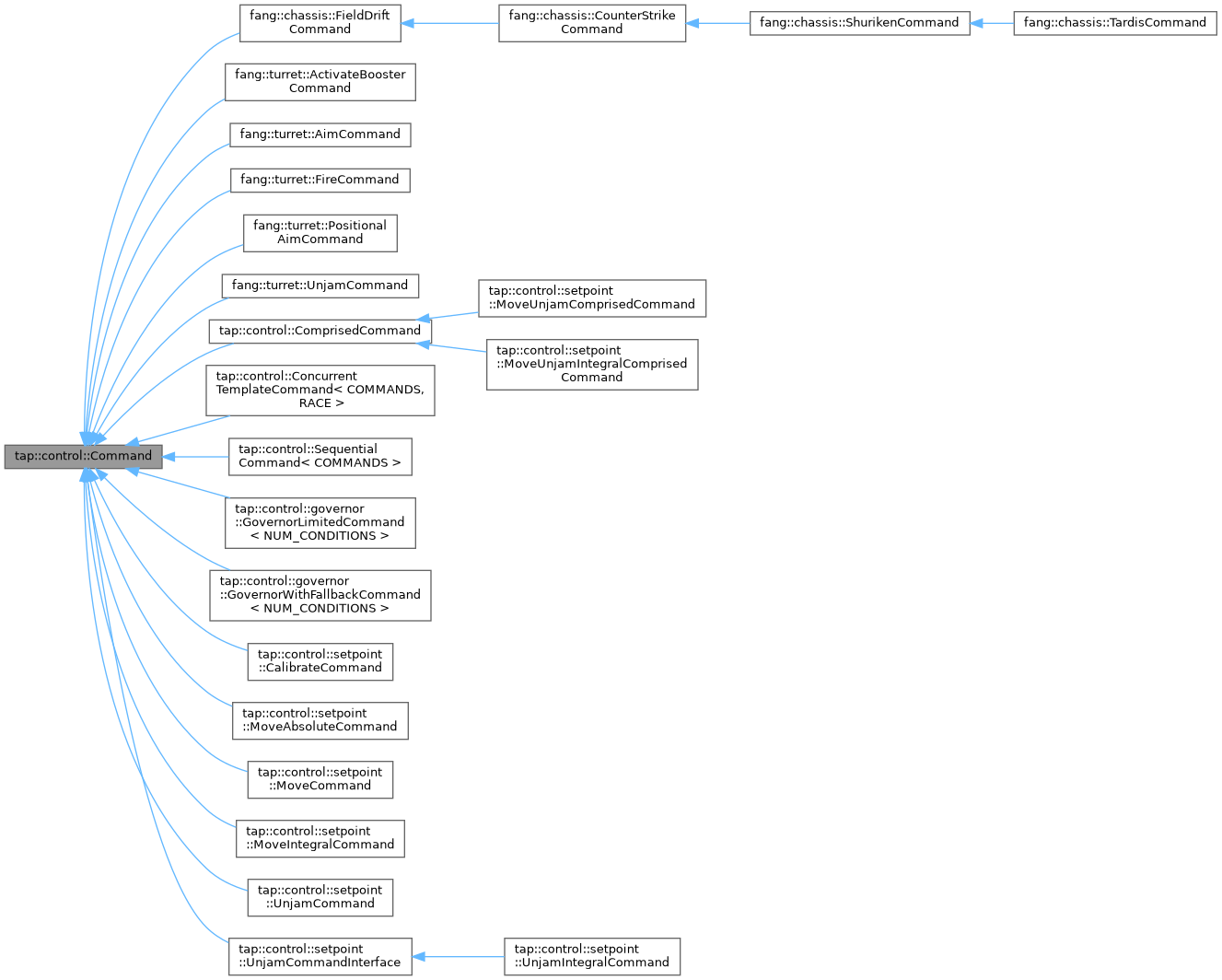
Public Member Functions | |
| Command () | |
| virtual | ~Command () |
| mockable subsystem_scheduler_bitmap_t | getRequirementsBitwise () const |
| int | getGlobalIdentifier () const |
| mockable void | addSubsystemRequirement (Subsystem *requirement) |
| virtual const char * | getName () const =0 |
| virtual bool | isReady () |
| virtual void | initialize ()=0 |
| virtual void | execute ()=0 |
| virtual void | end (bool interrupted)=0 |
| virtual bool | isFinished () const =0 |
Protected Attributes | |
| command_scheduler_bitmap_t | commandRequirementsBitwise = 0 |
Detailed Description
A generic extendable class for implementing a command. Each command is attached to a subsystem. To create a new command, extend the Command class and instantiate the virtual functions in this class. See example_command.hpp for example of this.
Constructor & Destructor Documentation
◆ Command()
| tap::control::Command::Command | ( | ) |
◆ ~Command()
|
virtual |
Member Function Documentation
◆ addSubsystemRequirement()
| void tap::control::Command::addSubsystemRequirement | ( | Subsystem * | requirement | ) |
Adds the required subsystem to a list of required subsystems.
- Parameters
-
[in] requirement the requirement to add to the list of requirements. If the requirement is nullptr or if the requirement is already in the set, nothing is added.
◆ end()
|
pure virtual |
The action to take when the command ends. Called when either the command finishes normally, or when it interrupted/canceled.
- Parameters
-
[in] interrupted whether the command was interrupted/canceled.
Implemented in fang::chassis::FieldDriftCommand, fang::turret::ActivateBoosterCommand, fang::turret::FireCommand, fang::turret::UnjamCommand, fang::turret::AimCommand, fang::turret::PositionalAimCommand, tap::control::ConcurrentTemplateCommand< COMMANDS, RACE >, tap::control::governor::GovernorLimitedCommand< NUM_CONDITIONS >, tap::control::governor::GovernorWithFallbackCommand< NUM_CONDITIONS >, tap::control::SequentialCommand< COMMANDS >, tap::control::setpoint::CalibrateCommand, tap::control::setpoint::MoveAbsoluteCommand, tap::control::setpoint::MoveCommand, tap::control::setpoint::MoveIntegralCommand, tap::control::setpoint::MoveUnjamComprisedCommand, tap::control::setpoint::MoveUnjamIntegralComprisedCommand, tap::control::setpoint::UnjamCommand, and tap::control::setpoint::UnjamIntegralCommand.
◆ execute()
|
pure virtual |
The main body of a command. Called repeatedly while the command is scheduled by a CommandScheduler.
Implemented in fang::chassis::CounterStrikeCommand, fang::chassis::FieldDriftCommand, fang::chassis::ShurikenCommand, fang::chassis::TardisCommand, fang::turret::ActivateBoosterCommand, fang::turret::FireCommand, fang::turret::UnjamCommand, fang::turret::AimCommand, fang::turret::PositionalAimCommand, tap::control::ConcurrentTemplateCommand< COMMANDS, RACE >, tap::control::governor::GovernorLimitedCommand< NUM_CONDITIONS >, tap::control::governor::GovernorWithFallbackCommand< NUM_CONDITIONS >, tap::control::SequentialCommand< COMMANDS >, tap::control::setpoint::CalibrateCommand, tap::control::setpoint::MoveAbsoluteCommand, tap::control::setpoint::MoveCommand, tap::control::setpoint::MoveIntegralCommand, tap::control::setpoint::MoveUnjamComprisedCommand, tap::control::setpoint::MoveUnjamIntegralComprisedCommand, tap::control::setpoint::UnjamCommand, and tap::control::setpoint::UnjamIntegralCommand.
◆ getGlobalIdentifier()
|
inline |
◆ getName()
|
pure virtual |
- Returns
- the name of the command, to be implemented by derived classes.
Implemented in fang::chassis::CounterStrikeCommand, fang::chassis::FieldDriftCommand, fang::chassis::ShurikenCommand, fang::chassis::TardisCommand, fang::turret::ActivateBoosterCommand, fang::turret::FireCommand, fang::turret::UnjamCommand, fang::turret::AimCommand, fang::turret::PositionalAimCommand, tap::control::ConcurrentTemplateCommand< COMMANDS, RACE >, tap::control::governor::GovernorLimitedCommand< NUM_CONDITIONS >, tap::control::governor::GovernorWithFallbackCommand< NUM_CONDITIONS >, tap::control::SequentialCommand< COMMANDS >, tap::control::setpoint::CalibrateCommand, tap::control::setpoint::MoveAbsoluteCommand, tap::control::setpoint::MoveCommand, tap::control::setpoint::MoveIntegralCommand, tap::control::setpoint::MoveUnjamComprisedCommand, tap::control::setpoint::MoveUnjamIntegralComprisedCommand, tap::control::setpoint::UnjamCommand, and tap::control::setpoint::UnjamIntegralCommand.
◆ getRequirementsBitwise()
|
inline |
Specifies the encoded set of subsystems used by this command. Two commands cannot use the same subsystem at the same time. If another command is scheduled that shares a requirement, the command will be interrupted. If no subsystems are required, return an empty set.
The generic Command class contains a list of the requrements. The user should add requirements to this list accordingly (typically in the constructor of a class extending the Command class). If a Command does not specify any requirements, the Command cannot be added to the CommandScheduler.
- See also
- CommandScheduler
- Returns
- the set of subsystems that are required.
◆ initialize()
|
pure virtual |
The initial subroutine of a command. Called once when the command is initially scheduled by a CommandScheduler.
Note that command instances are re-used: a single command could be initialized, run, finished, then later initialized again. Ensure that initialize() resets any state stored in the command!
Implemented in fang::chassis::FieldDriftCommand, fang::turret::ActivateBoosterCommand, fang::turret::FireCommand, fang::turret::UnjamCommand, fang::turret::AimCommand, fang::turret::PositionalAimCommand, tap::control::ConcurrentTemplateCommand< COMMANDS, RACE >, tap::control::governor::GovernorLimitedCommand< NUM_CONDITIONS >, tap::control::governor::GovernorWithFallbackCommand< NUM_CONDITIONS >, tap::control::SequentialCommand< COMMANDS >, tap::control::setpoint::CalibrateCommand, tap::control::setpoint::MoveAbsoluteCommand, tap::control::setpoint::MoveCommand, tap::control::setpoint::MoveIntegralCommand, tap::control::setpoint::MoveUnjamComprisedCommand, tap::control::setpoint::MoveUnjamIntegralComprisedCommand, tap::control::setpoint::UnjamCommand, and tap::control::setpoint::UnjamIntegralCommand.
◆ isFinished()
|
pure virtual |
Whether the command has finished. Once a Command finishes, the scheduler will call the end() function and un-schedule it. If a Command is naturally finished (i.e. isFinished() == true), then the CommandScheduler will pass in false to end(). If, for example, another Command is added that in turn stops the Command from executing, then the CommandScheduler will pass in true to end().
- Returns
- whether the command has finished.
Implemented in fang::chassis::FieldDriftCommand, fang::turret::ActivateBoosterCommand, fang::turret::FireCommand, fang::turret::UnjamCommand, fang::turret::AimCommand, fang::turret::PositionalAimCommand, tap::control::ConcurrentTemplateCommand< COMMANDS, RACE >, tap::control::governor::GovernorLimitedCommand< NUM_CONDITIONS >, tap::control::governor::GovernorWithFallbackCommand< NUM_CONDITIONS >, tap::control::SequentialCommand< COMMANDS >, tap::control::setpoint::CalibrateCommand, tap::control::setpoint::MoveAbsoluteCommand, tap::control::setpoint::MoveCommand, tap::control::setpoint::MoveIntegralCommand, tap::control::setpoint::MoveUnjamComprisedCommand, tap::control::setpoint::MoveUnjamIntegralComprisedCommand, tap::control::setpoint::UnjamCommand, and tap::control::setpoint::UnjamIntegralCommand.
◆ isReady()
|
virtual |
A check called right before a command is scheduled to determine whether or not a command should be scheduled. If return is true then the command is scheduled, if false then the command is not scheduled.
Not forced to be overridden, returns true by default.
Reimplemented in tap::control::ConcurrentTemplateCommand< COMMANDS, RACE >, tap::control::governor::GovernorLimitedCommand< NUM_CONDITIONS >, tap::control::governor::GovernorWithFallbackCommand< NUM_CONDITIONS >, tap::control::SequentialCommand< COMMANDS >, tap::control::setpoint::CalibrateCommand, tap::control::setpoint::MoveAbsoluteCommand, tap::control::setpoint::MoveCommand, tap::control::setpoint::MoveIntegralCommand, tap::control::setpoint::MoveUnjamIntegralComprisedCommand, tap::control::setpoint::UnjamCommand, and tap::control::setpoint::UnjamIntegralCommand.
Member Data Documentation
◆ commandRequirementsBitwise
|
protected |
The documentation for this class was generated from the following files:
- fang-mcb-project/taproot/src/tap/control/command.hpp
- fang-mcb-project/taproot/src/tap/control/command.cpp